

P-Series V25.1 GA is ready for production following the Alpha and Beta cycles. It empowers AI virtual receptionists with business execution capabilities, SMS delivery and secure tool invocation, and strengthens administrator permission controls. Core updates include:
| Feature | Summary | Configuration Guide |
|---|---|---|
| AI Receptionist SMS & MCP | AI agents send SMS confirmations directly during calls and safely invoke third-party tools via Model Context Protocol (MCP), enabling securely end-to-end business automation. | Setting Up MCP Server for AI Receptionist Setting Up SMS Skills for AI Receptionist |
| Direct Live Chat URL | PBX generates shareable chat links for emails or signatures, enabling customers to click and connect instantly. | Setting Up a Live Chat Channel |
| Automatic Call Transcription Control | Admins can now manage AI transcription permissions with granular precision across specific call scenarios. | Automatic Call Transcription |
Release Note: Cloud Edition | Appliance Edition | Software Edition
PBX New Features
AI Receptionist: SMS & MCP Integration
AI Receptionist SMS Messaging
P-Series PBX Virtual AI agents can automatically send SMS to customers during calls based on configurable rules, eliminating manual send steps. Common scenarios include appointment confirmations, order tracking updates, and post-service follow-ups.
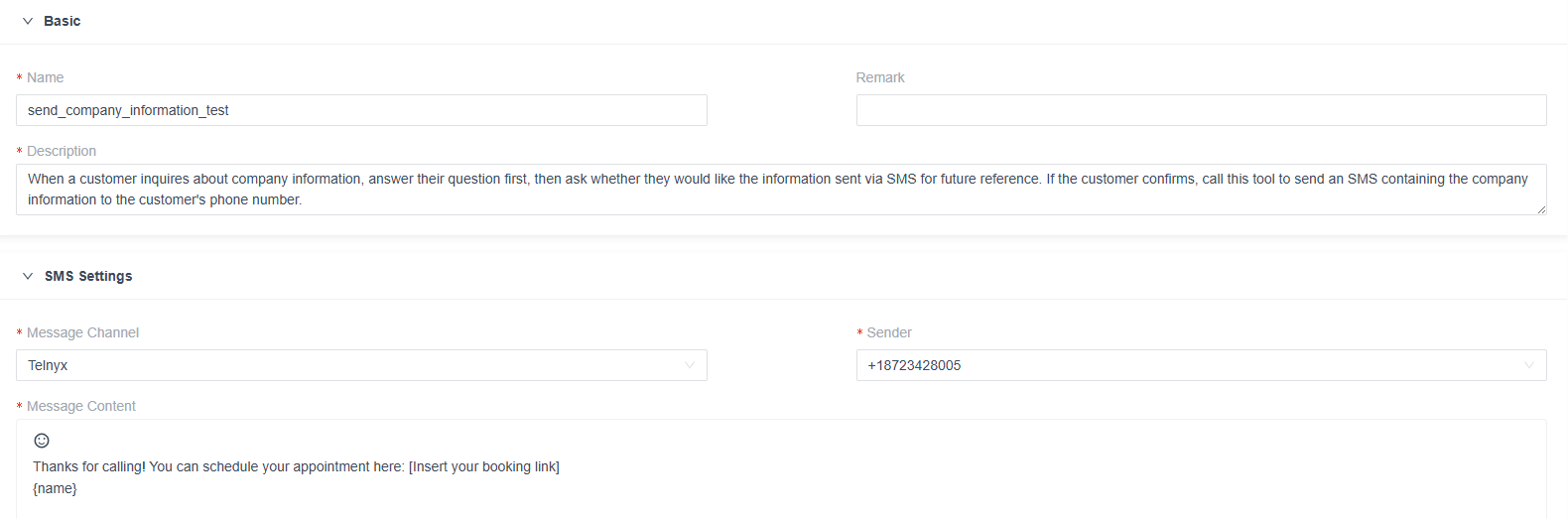
How It Works:
During a call, the AI receptionist detects predefined trigger conditions and automatically invokes the PBX SMS API via the configured channel to send a text. The AI extracts key details directly from the conversation, such as name, address, time, or phone number, and automatically inserts them into a pre-built or custom SMS template for instant delivery.
Key Highlights:
- Official Templates+ Custom Rules: Access pre-built templates for appointment confirmations, order tracking, product info, and support tickets. Each virtual agent supports up to 10 custom sending rules to flexibly meet diverse business needs.
- Intelligent Variable Extraction: AI automatically extracts customer details (e.g., name, appointment time) from the conversation to populate variables, significantly reducing editing complexity.
- Immediate Confirmation Experience: Customers receive SMS confirmations immediately after call completion, reducing follow-up friction and boosting conversion rates, especially critical for booking and order scenarios.
Configuration Guide: Setting Up SMS for AI Receptionist
Custom MCP Server Integration
Model Context Protocol (MCP) is a secure gateway for voice AI receptionists to interact with third-party tools, eliminating direct and risky exposure to external APIs or databases.
With the P-Series PBX V25.1 update, administrators can register custom MCP servers, define execution rules, and assign specific tools to designated AI receptionists with granular control.
As a standard protocol, MCP allows businesses to easily import multi-tool bundles and instantly connect out-of-the-box, third-party MCP services, even without internal development resources.
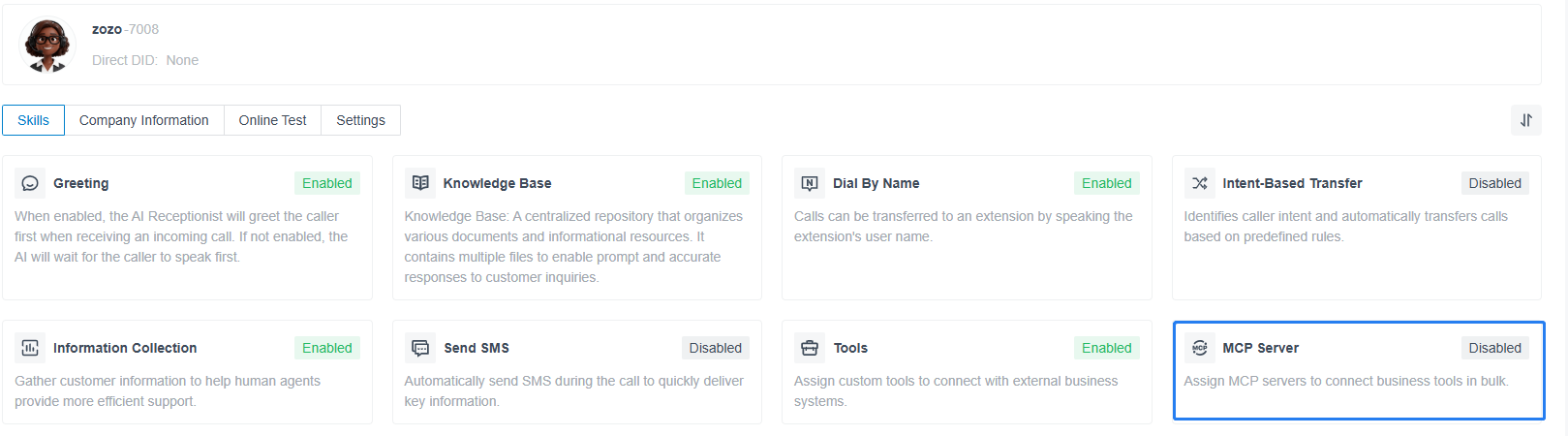
Configuration Flow:
Admins register the MCP Server → Import and configure multiple tools → Define tool execution rules → Assign specific tools to designated AI receptionists → AI receptionists invoke authorized tools during calls → Tool results are returned and logged in the CDR
Key Highlights:
- Flexible Tool Allocation: Easily assign specific custom tool subsets to virtual agents or departments based on their specific roles. This ensures the right tools are always allocated to align with organizations’ workflows.
- Flexible Tool Ecosystem: A single AI receptionist can invoke tools from multiple vendors (e.g., CRM, ERP, and inventory systems) using the MCP Server as a unified hub. This enables flexible cross-platform workflows, allowing the voice AI agents to handle complex business scenarios smoothly and efficiently.
- Enterprise-Grade Observability: All tool invocations, execution times, results, and exceptions are logged to CDR, supporting enterprise audit and troubleshooting needs.
Configuration Guide: Setting Up MCP Server for AI Receptionist
Direct Live Chat URL
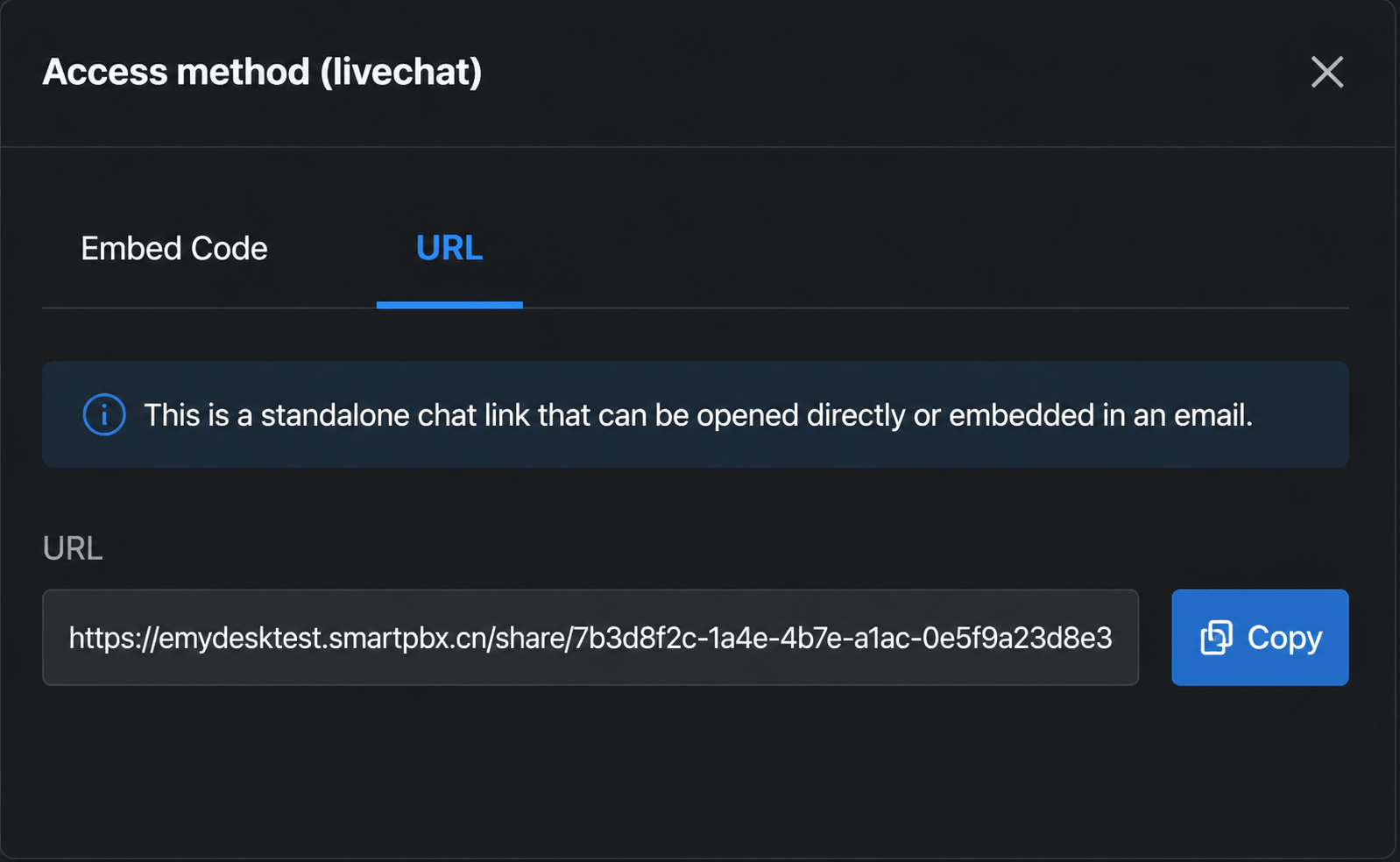
Beyond standard website embedding, P-Series PBX Live Chat now supports shareable, direct links. You can generate unique Live Chat URLs to embed in emails, signatures, or share across any channel, enabling customers to initiate a web chat or voice call instantly with a single click.
Impact & Value:
- Frictionless Communication: Eliminates unnecessary website navigation and contact searching. By reducing the customer journey to a single “click-and-talk” action, it significantly lowers the barrier to engagement and accelerates sales conversions.
- Versatile Touchpoints: Turn every outbound interaction into an active entry point. Embed the URL in sales outreach, support signatures, or marketing campaign materials to capture customer interest the moment it happens.
Configuration Guide: Setting Up A Live Chat Channel
Automatic Call Transcription Control
Designed to ensure important conversations are reliably captured, this update helps businesses keep clear call records, proving especially useful for sectors like healthcare and legal services. Administrators can configure automated, multi-dimensional AI call transcription rules based on call direction (internal, inbound, outbound) and target entity (extension, trunk, ring group). For added convenience, agents can simply dial a feature code (*09 by default) to start transcription during a call whenever they need a quick, hands-free record of the conversation.
Configuration Guide: Automatic Call Transcription
Other Optimization
P-Series Software Edition(PSE) setup wizard can now be completed via API endpoints instead of manual web console configuration. The setup API directly initializes system settings and activation, then returns API credentials (Client ID and Client Secret) for subsequent API operations, streamlining PSE provisioning workflows.