
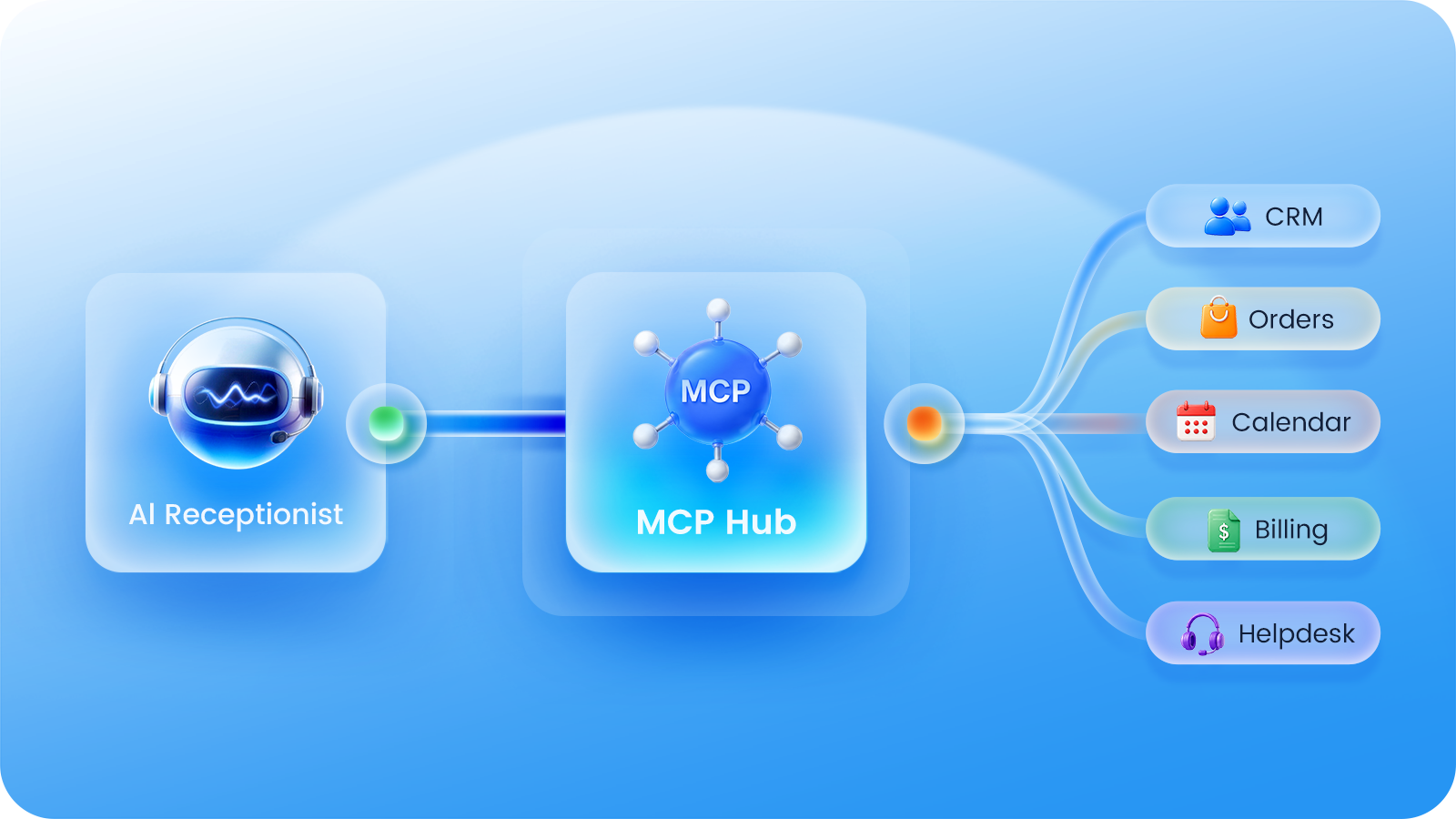
Most AI receptionists today can already reach external systems. Looking up an order, pulling a customer record, or checking a calendar. All of these are possible through one-to-one API integrations. The real pain point isn’t whether the connection exists, but what happens afterward. Every integration is custom-built. When an order system updates its API, the receptionist’s lookup feature breaks until someone fixes it. When the CRM vendor changes, the entire integration has to be rebuilt from scratch. Want to connect three more systems? That means three more custom engineering projects. AI receptionists don’t lack integration capability. What they lack is a connection approach that scales without spiraling costs. MCP was created to solve exactly this problem: a single standard that lets AI receptionists connect to business systems in the same way USB-C allows one cable to work with virtually any device.
What Is MCP?
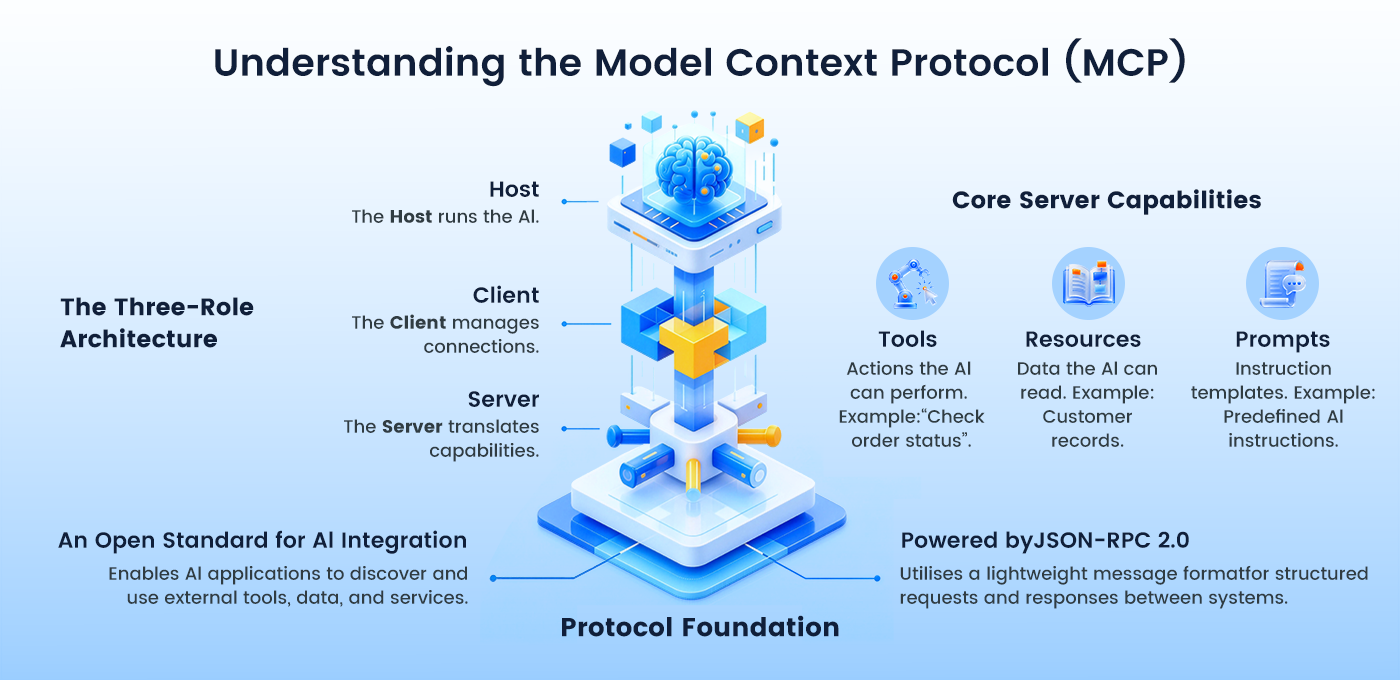
MCP, short for Model Context Protocol, is an open protocol released by Anthropic in November 2024. It defines a standard way for AI applications to discover and use external tools, data, and services. Communication runs on JSON-RPC 2.0, a lightweight message format that lets two sides exchange structured requests and responses.
The architecture involves three roles. The Host is the application running the AI, such as your AI receptionist. The Client is a built-in connection layer within the Host that maintains a one-to-one connection with each Server. The Server is a program that translates a business system’s capabilities into a standard interface the AI can understand. Each Server provides three types of capabilities: Tools, which are actions the AI can perform, such as “check order status”; Resources, which are data the AI can read, such as customer records; and Prompts, which are predefined instruction templates.
Here’s how it works in practice. When the AI starts up, it asks each connected Server what it can do. The Server returns a list of capabilities, along with a natural-language description of each one. During the conversation, the AI reads these descriptions and decides on its own when to call a particular capability. It sends a request, receives a structured result, and uses that result to generate a response. No custom code needs to be written for each system. The description itself serves as the configuration.
This working model delivers three direct benefits. First, the AI makes its own decisions. Instead of hard-coding “if the user asks X, call Y” for every scenario, the AI makes judgments based on the tool descriptions, allowing coverage to expand naturally as more systems come online. Second, configuration becomes integration. Adding a new system means adding one Server entry, while the receptionist’s own code remains untouched. Third, capabilities can be combined. The AI can chain calls across systems within a single conversation, for example, verifying the caller’s identity in the CRM, looking up an order, and then scheduling a callback, creating services that no single system could deliver on its own.
MCP is an industry standard, not a proprietary solution from a single vendor. Its official SDKs have surpassed 97 million monthly downloads. In December 2025, Anthropic donated the protocol to the Linux Foundation’s Agentic AI Foundation, whose members include OpenAI, Google, and Microsoft. An MCP Server built for your CRM today doesn’t just work with your AI receptionist; it works with any MCP-compatible AI application your company might adopt tomorrow. Build once, connect everywhere.
Why AI Receptionists Need MCP
How much an AI receptionist can do depends on how many systems it connects to. Connect it to an order system, and it can track shipments during a call. Connect it to a CRM, and it can identify callers and pull up their history. Connect it to a calendar, and it can check availability and book meetings on the spot. Every new system adds another category of calls the AI receptionist can handle independently, reducing the share of calls that require a human.
The problem is that traditional one-to-one API integrations do not scale. They multiply. Each system has its own API specifications, authentication methods, and data formats. If your receptionist supports M capabilities and needs to connect to N systems, the integration workload becomes M multiplied by N. Five capabilities across five systems means 25 custom integrations.
Maintenance compounds the problem. When any system updates its API, changes a field, or adjusts its authentication method, every integration tied to it needs to be reworked. A single system changing its interface can break code in M different places. And adding a new capability to the receptionist means building it against all N systems one by one. The richer the service becomes, the higher the marginal cost of expanding it.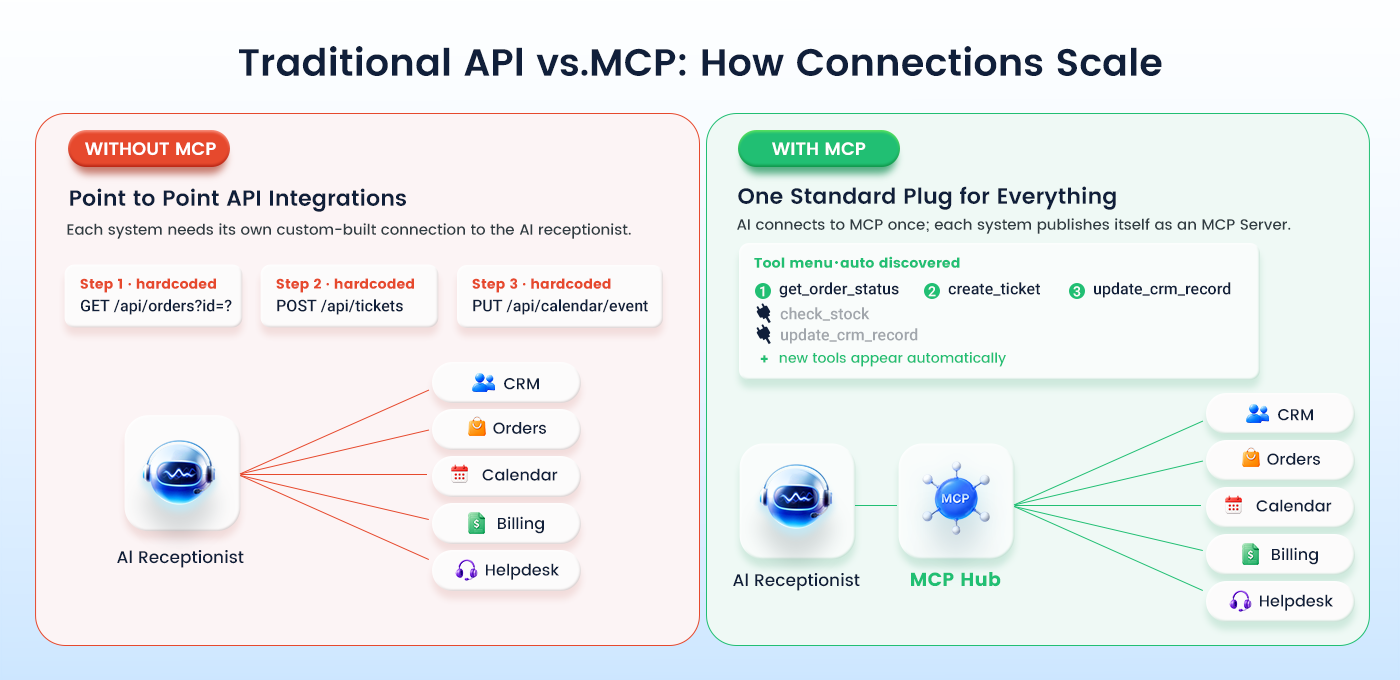
For voice AI, breadth of integration is not optional. The caller is on the line and expects an answer during the call, not a callback later. Every system the receptionist can reach means one more type of call it resolves on its own. Every system it cannot reach means another call transferred to a human agent. Traditional integrations make broad connectivity expensive, so most AI receptionists end up handling only a specific set of scenarios.
MCP changes this equation entirely, not just for initial setup, but for how capabilities grow over time. With traditional integrations, every new feature on the business system side requires a matching update on the PBX side. With MCP, the Server publishes its own capabilities autonomously. If your order system adds a “modify delivery address” endpoint next month, the AI receptionist discovers and uses it immediately, without a single change in PBX configuration. The receptionist’s service boundary isn’t managed by an administrator; it evolves automatically as the business systems evolve.
MCP standardizes the connection. Each business system publishes its capabilities as an MCP Server once, and any MCP-compatible receptionist can use them right away. Adding a system becomes a configuration entry, not an engineering project. The receptionist’s service range expands at low, predictable cost. That is the core value MCP brings to AI receptionists.
How MCP Works Inside an AI Receptionist
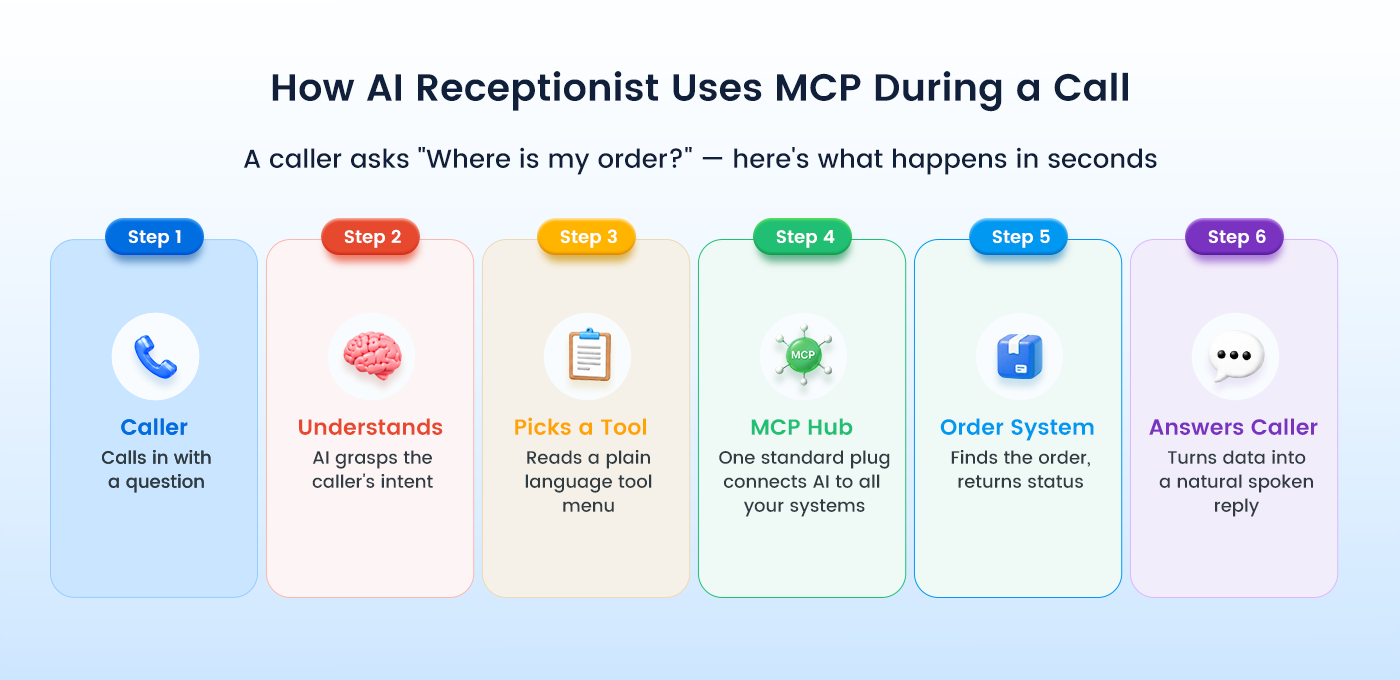
Consider a caller who asks, “Where is my order?” Here’s what happens in the seconds that follow.
First, the AI receptionist understands the question and identifies the intent: the caller wants a shipping update. Second, it reviews its connected MCP Servers, reads their natural-language descriptions, and selects the right tool, say get_order_status on the order system’s Server. Third, it sends the request with the order number and receives a structured result: carrier, current status, estimated delivery. Fourth, it turns that data into a spoken reply: “Your order shipped yesterday and should arrive by Thursday.”
The key concept here is the tool description. When you configure an MCP Server, you write a brief natural-language explanation of what it offers. The AI Receptionist reads these descriptions to decide which system to call and when. In effect, configuring MCP is like handing the receptionist a map of your business: this system handles orders, this one manages calendars, this one creates tickets. And the map draws itself.
What You Can Do with Yeastar AI Receptionist + MCP
With MCP support for the Yeastar P-Series Phone System AI Receptionist, the front desk evolves from conversational to operational. It can interact with your business systems directly during live calls, turning many calls that once required human handoff into self-contained, end-to-end service. A single PBX supports up to 20 MCP Servers globally, and each AI Receptionist can be assigned up to 5, letting you focus the receptionist on the systems that matter most.
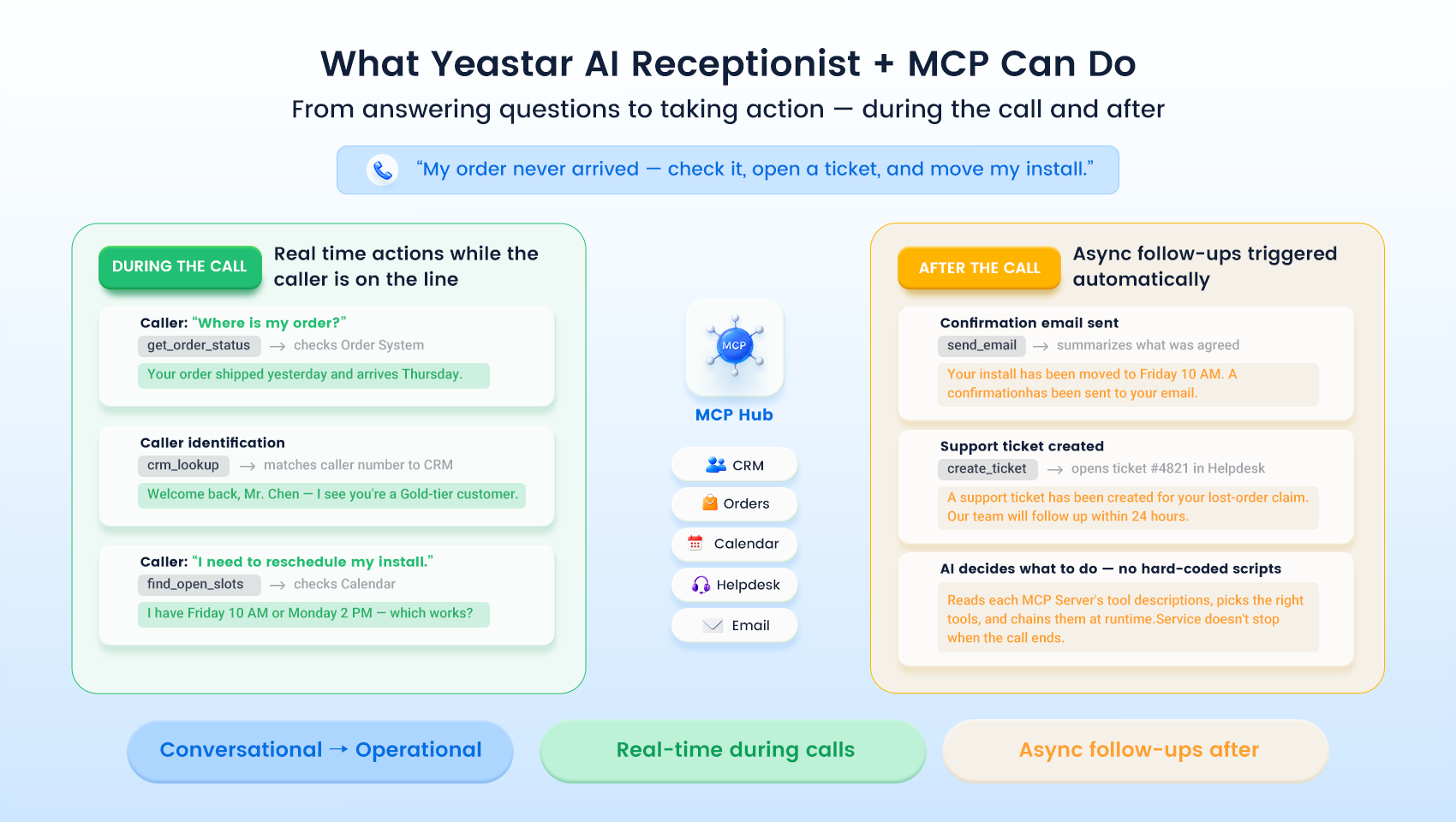
In practice, this means real-time action during calls: checking order or ticket status, identifying callers through CRM lookup, and finding open time slots to book meetings straight into a shared calendar. After the caller hangs up, the receptionist can trigger asynchronous follow-ups like sending confirmation emails or creating support tickets, so service doesn’t stop when the call ends. Because the AI reads each Server’s tool descriptions and decides when to act, you don’t hard-code every scenario. You describe your capabilities, and the receptionist acts on them intelligently. All connections run over HTTPS with static credentials (API Key, Basic Auth, or Bearer Token), keeping access controlled and auditable.
Start Connecting Your AI Receptionist
The day interfaces become standardized is the day AI receptionists truly go to work. MCP turns integration, the hardest part of deploying an AI front desk, from a custom project into a standard connection. One protocol. Every system. No reinventing the wheel each time. If you’re ready to give your AI receptionist real access to your business tools, explore the Yeastar P-Series PBX AI Receptionist and its MCP capabilities, or dive into the configuration guide to set up your first MCP server.