

P-Series PBX Updates(Nov. 2025): Built-in STIR/SHAKEN Solution, Red Hat SSO Integration & More
4.9 min read
The latest P-Series PBX firmware comes with a set of updates that make your system more secure, compliant, and easier to manage.
Most notably, it delivers built-in STIR/SHAKEN support to help service providers meet FCC and CRTC requirements and ensure trusted communications. Alongside that, it adds Red Hat SSO Integration to simplified user management and enable seamless single sign-on. Lastly, it allows to select and monitor DOD directly via BLF.
👉 Read on to explore what’s new, why it matters, and how to get started with these new features!
Jump to ↓
- New Features
- Related Resources →
- New Feature Configuration Guides
- More Supported SSO Integrations (Microsoft, Google)
- P-Series PBX Updates from the Past Year
- PBX Firmware Updates and Free Trial
New Features
Built-in STIR/SHAKEN Soution
STIR/SHAKEN is a set of protocols and frameworks designed to combat caller ID spoofing on public telephone networkst. The FCC in the U.S. and the CRTC in Canada have required carriers to adopt these protocols since 2021.
We are very excited to announce that the P-Series PBX Cloud Edition supports built-in STIR/SHAKEN implementation for shared trunks now!
This means no need for external signing services, third-iparty SBCs, manual installation, or additional costs, allowing you to leverage the industry-standard call authentication framework directly within your phone system.
Building the STIR/SHAKEN framework natively into the PBX is a key step to help you meet global telecom regulatory requirements easily; reduce spoofing, fraud, and robocalls efficiently; and boost customer trust and satisfaction effectively.
Key Capabilities of STIR/SHAKEN in Yeastar PBX
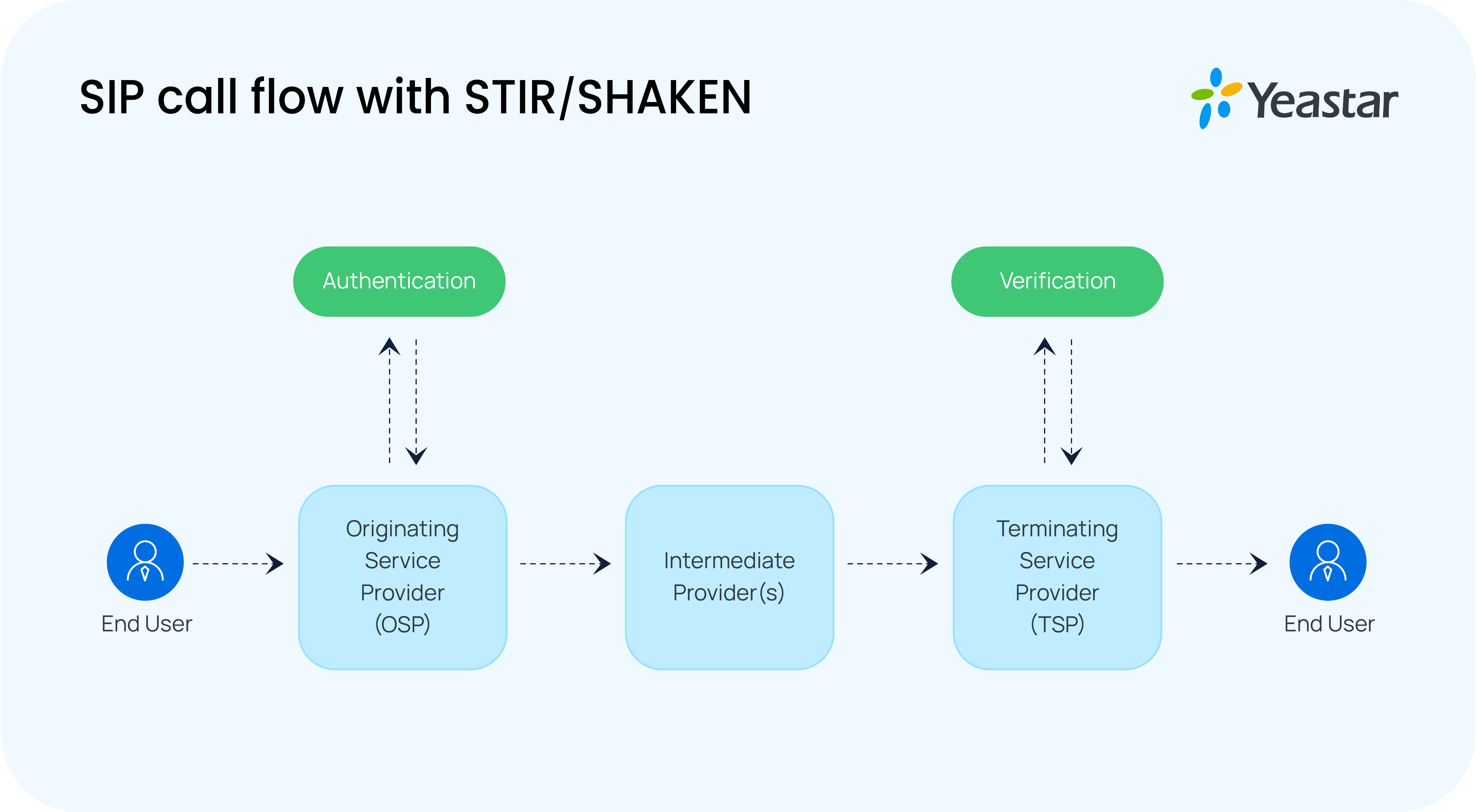
With the built-in STIR/SHAKEN support, the system offers a complete framework for call athentication and verification.
- Outbound call signing: Automatically signs outbound calls on the uploaded digital certificate, excluding emergency numbers or expired certificates.
- Inbound call verification: Retrieves the public key and validates the signature to verify incoming calls.
- Call filtering: Drop the untrusted or unsafe calls, including those from upstream carriers.
- Verification result logging: Records all verification results in CDRs for easy review and traceability.
Configure STIR/SHAKEN on YCM
Before proceeding with the service implementation, please note that it is mandatory for every partner to obtain the SS certificate from the policy administrator. How to obtain the STI certificate, explore in this blog. Then complete the setup on the Yeastar Central Management (YCM) platform with this process:
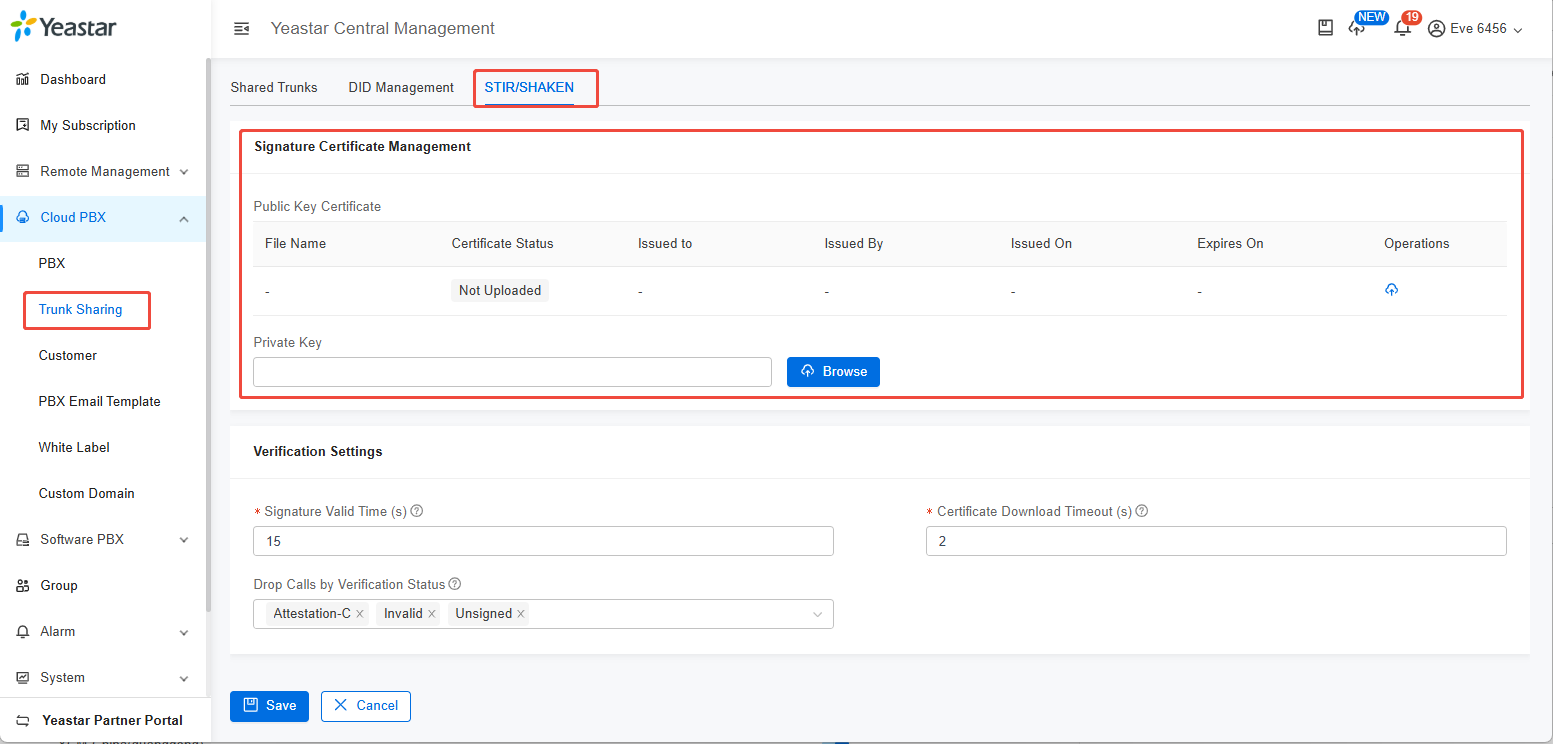
- Log in to YCM, navigate to Cloud PBX → Trunk Sharing, and follow the on-screen instructions to start the setup.
- Upload the certificate and private key, used for signing outbound calls to authenticate caller identity.
- Set verification strategy, configure how inbound calls are verified and handled, including signature valid time, certificate download timeout and drop calls with verification status.
- Enable STIR/SHAKEN on shared trunks, with flexible options to apply signing, verification, both, or disable entirely, supporting handling of calls from upstream carriers.
For detailed setup instructions, please refer to the configuration guide.
*Note: To use this feature, make sure both your PBX and YCM are updated to the latest versions. STIR/SHAKEN is already available on the latest PCE (Yeastar Hosted). Support for PCE (BYOI) will go live on November 17.
Red Hat SSO Integration
This time, the PBX adds support for another SSO integration tool — Red Hat.
Before diving into the feature itself, let’s take a quick look at Red Hat and its Single Sign-On (SSO) solution.
About Red Hat:
Red Hat, Inc. is an American software company known for its open-source enterprise solutions. Its flagship product, Red Hat Enterprise Linux (RHEL), is widely used by businesses to build and manage secure, scalable IT environments.
About Red Hat Single Sign-On (SSO)
Red Hat SSO provides a unified login solution for web applications and RESTful web services. It enables users to access multiple systems with one set of credentials while giving administrators centralized control over authentication and security policies.
How it works with P-Series PBX
Built on the SAML 2.0 protocol, the P-Series PBX can now integrate seamlessly with Red Hat SSO, with the PBX acting as the Service Provider (SP) and Red Hat as the Identity Provider (IdP).
This allows the PBX, during the SSO process, to initiate an authentication request, while Red Hat is responsible for verifying the user’s identity and issuing authentication credentials.
Key Capabilities
This integration enhances both compatibility and security while automating user management:
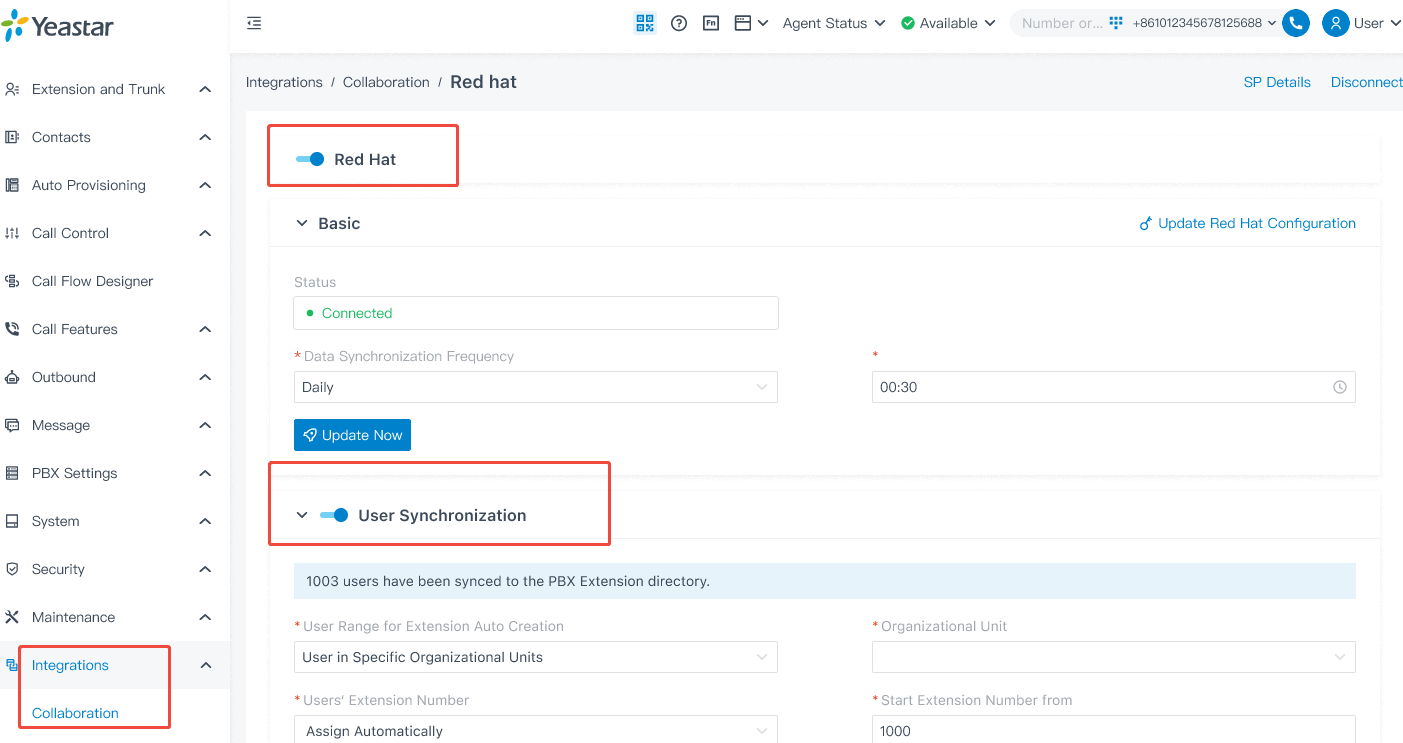
- Auto user sync and extension creation: Sync Red Hat users in specific organizations or groups automatically and create extensions based on predefined rules.
- Delete the Extensions no longer in sync: Remove extensions when users are no longer synced (admin-configurable).
- User information synchronization: Keep profile details such as name, email, phone number, and job title always up to date.
- Single sign-on (SSO): Enable users to log in to the PBX, including the Linkus Desktop and Web Clients, directly with their Red Hat account, without repeated logins or extra passwords.
This integration simplifies account management for admins by eliminating repetitive operations and platform switching, while giving users a seamless, secure one-click login experience.
*Learn more about this integration and how to set it up on the feature page or configuration guide.
Switch DOD via BLFs
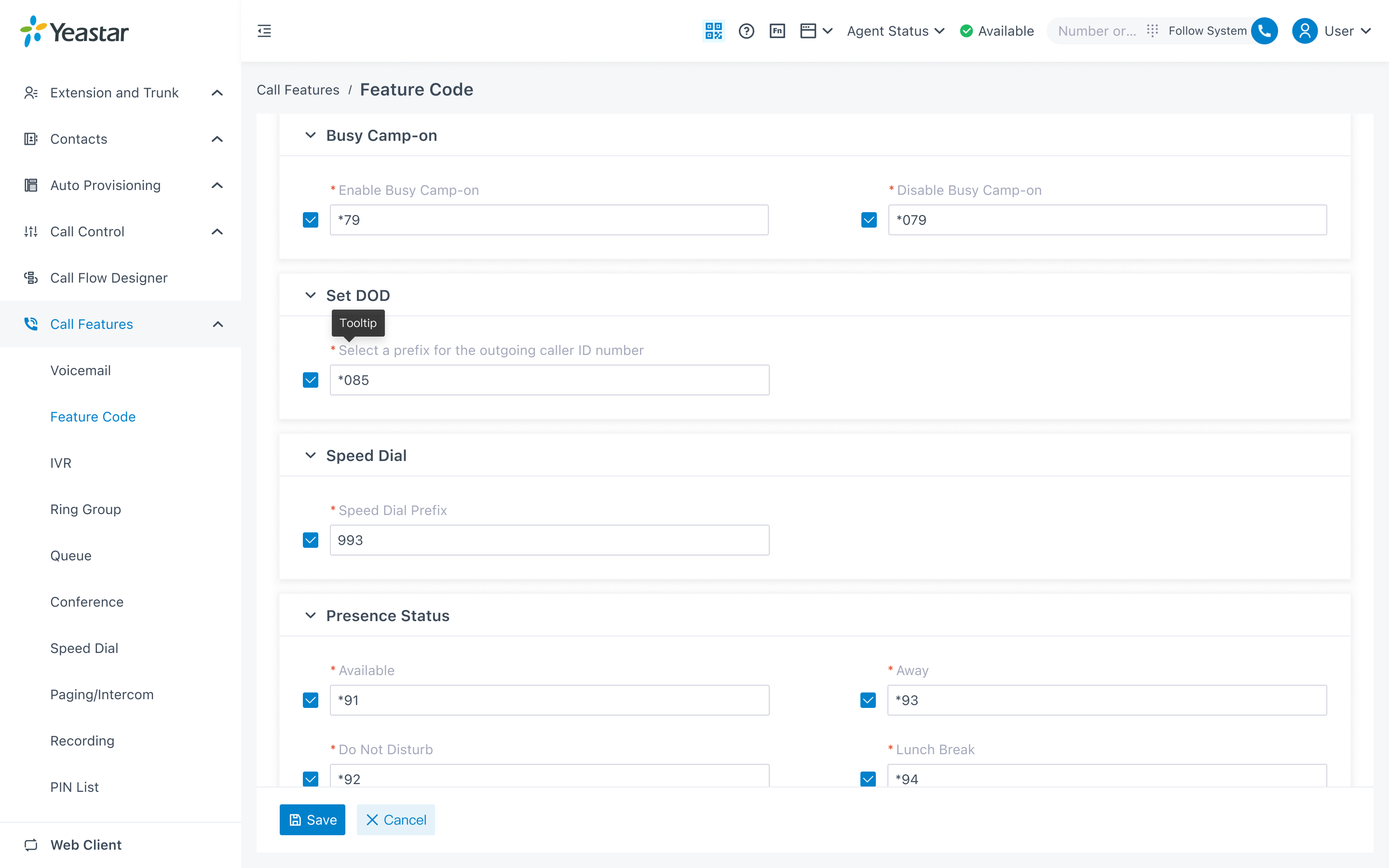
The P-Series PBX now supports setting DOD via feature code. Users can easily select their outbound number by entering the feature code + DOD directly from the phone interface, or choosing it on the Linkus UC Clients panel. Meanwhile, admins can monitor monitor DOD switching through BLF for improved visibility and control.
This enables users to display different company numbers for different clients and gives admins clear oversight of trunk usage.
Additional Optimizations
SIP 302 Redirect Support: To meet French regulatory requirements, P-Series PBX now supports SIP 302 Redirect. When a call is forwarded to an external number, the original caller ID is preserved, allowing the recipient to see who’s actually calling.
For more details about this P-Series update, visit the release notes here: Cloud Edition | Appliance Edition | Software Edition
Newly Supported Phone Models (Oct 15 – Nov 11)
| Vendor | Phone Model |
|---|---|
| Snom | E303, SnomD892, SnomD895 |
Check the auto-provision support list for 500+ IP phones.
Related Resources
New Feature Configuration Guides
Step-by-step instructions for:
More SSO Integration platforms
P-Series PBX also supports three popular SSO platforms to simplify user authentication and management. Explore the details 👇
Keep up with the latest P-Series Updates
- Omnichannel Message API, PBX API Bulk Access and More (Oct 2025)
- AI Call Transcription & Summary, Virtual Fax & More (Sep 2025)
- Outbound Bulk Messaging, Group Reply for Queues, Call Compliance & More (Aug 2025)
- Call Flow Designer, Text-to-Speech, Voicemail Transcription, and More (July 2025)
- Presence Customization, Linkus CarPlay, S-Series to P-Series Migration, and More (June 2025)
- Dynamics 365 CRM Integration, Google SSO Integration, and More (May 2025)
- CRM Integration Template, Call Note, and More (March 2025)
- Outbound Call Center, Multi-Time Zone, and More (February 2025)
- Hotel Management, Unreturned Missed Call Report, and More (January 2025)
- Number Masking, NEC IP Phone Auto Provisioning, and More (December 2024)
- Extended YCM Task Support, PSE White Label, and More (November 2024)
Upgrade Your PBX and Start a Free Trial
- For PBX Admins: Upgrade your firmware through the management portal to explore the latest features.
- For New Users: Start a 30-day free trial and discover your favorite features.