




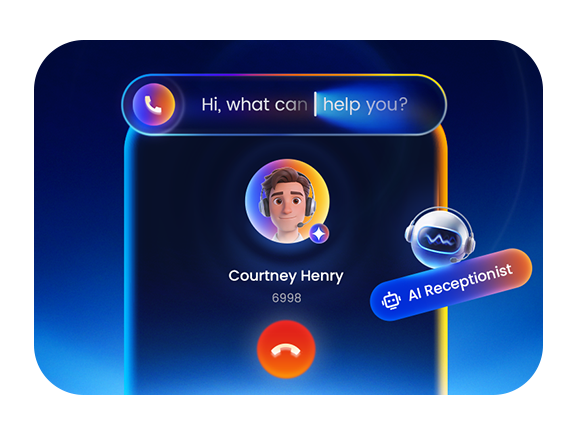
The AI Receptionist, released with the P-Series V23.3 BETA, marks a significant expansion of our AI capacities. This update reinforces our commitment to the ongoing integration of practical AI into modern communications. Beyond AI, this version also introduces Custom Call Reports for deeper data insights, Onsite Proxy for secure remote phone connection, and Multi-Client Linkus Login for a truly flexible work experience.
Additionally, Yeastar Central Management (YCM) now supports new AI capacity subscription plans and enhanced Cloud PBX management capabilities. Explore the latest updates through our feature videos and live demonstrations, dive into the details below, and join the V23.3 BETA to experience them firsthand!
Table of Contents
- Join the Beta →
- Upcoming Live Demo Webinar →
- P-Series PBX V23.3 BETA Features
- YCM Updates (For Partners and Resellers)
- Related Resources →
- V23.3 BETA Features Configuration Guides
- YCM Features Configuration Guides
- Recent Releases (Past 6 Months)
Join the Beta
Experience the AI Receptionist, Linkus Multi-Client Login, Custom Call Report, Onsite Proxy and more features on the P-Series PBX V23.3 BETA.
- Already using P-Series PBX? Simply go to your PBX admin portal and check for firmware updates. You can also download the Beta firmware here for offline installation.
⚠️ Note: If the PBX is running a version released before December 2025, the latest beta firmware may not be visible on your PBX. Please upgrade your PBX sequentially to the latest version to access new firmware and features. - New to P-Series PBX? Apply for a free trial license here and upgrade to the latest beta firmware to start testing.
Help Us Improve:
Found something that doesn’t work as expected or works better than expected? Share your feedback to help shape the final V23.3 release.

Join Our Live Demo: New Features Walkthrough & Your Questions Answered!
We are hosting a special live stream session to showcase the V23.3 BETA updates and provide an in-depth look at our latest AI Receptionist and Management enhancements.
You can see the new features in action! Beyond the live product demonstrations, this session offers a direct Q&A and interactive discussion with the Yeastar team. It’s the fastest and most intuitive way to get your questions answered and see how these tools work for your business.
- Date: April 9, 2026
- Time: 9:00 AM (GMT)
Don’t miss out! Be sure to hit the “🔔Notify Me” button below or add the event to your Google Calendar so you’ll be alerted the moment we go live. We look forward to seeing you there!
P-Series PBX V23.3 BETA Features
Before diving into the details, watch our “What’s New” video for a quick guide to all the latest features!
AI Receptionist
The AI Receptionist is available in the P-Series Phone System Cloud Edition and Software Edition, leverages advanced Natural Language Processing (NLP) to transform how businesses handle inbound traffic. Beyond simple automated greetings, it can engage in context-aware conversations, answer calls 24/7, and routes calls with human-like precision.
How AI Receptionist Works within P-Series Phone System
Positioned at the front end of your P-Series PBX, the AI Receptionist filters and resolves queries before they even reach the team, utilizing your knowledge base for every response.
- Smart Greeting & Contextual Awareness: When a call arrives, the AI Receptionist greets the caller using preset scripts and a “Company Information” block, ensuring a professional and brand-aligned first impression.
- Knowledge-Driven Interactions: The core engine analyzes caller intent in real-time. By referencing the specific uploaded documents or indexed website content, the AI provides accurate, low-latency answers directly over the phone.
- Intent-Based Routing: If a query requires human intervention or the caller asks for a specific person, the AI Receptionist executes an instant transfer to the designated extension or department, with no manual input or menu navigation required.
- Actionable Insights & Analytics: Admins can track AI Receptionist performance via CDR and detailed Call Reports. By analyzing handling times, transcripts, summaries, and more, you can optimize AI agent strategies and ensure top-tier communication quality.
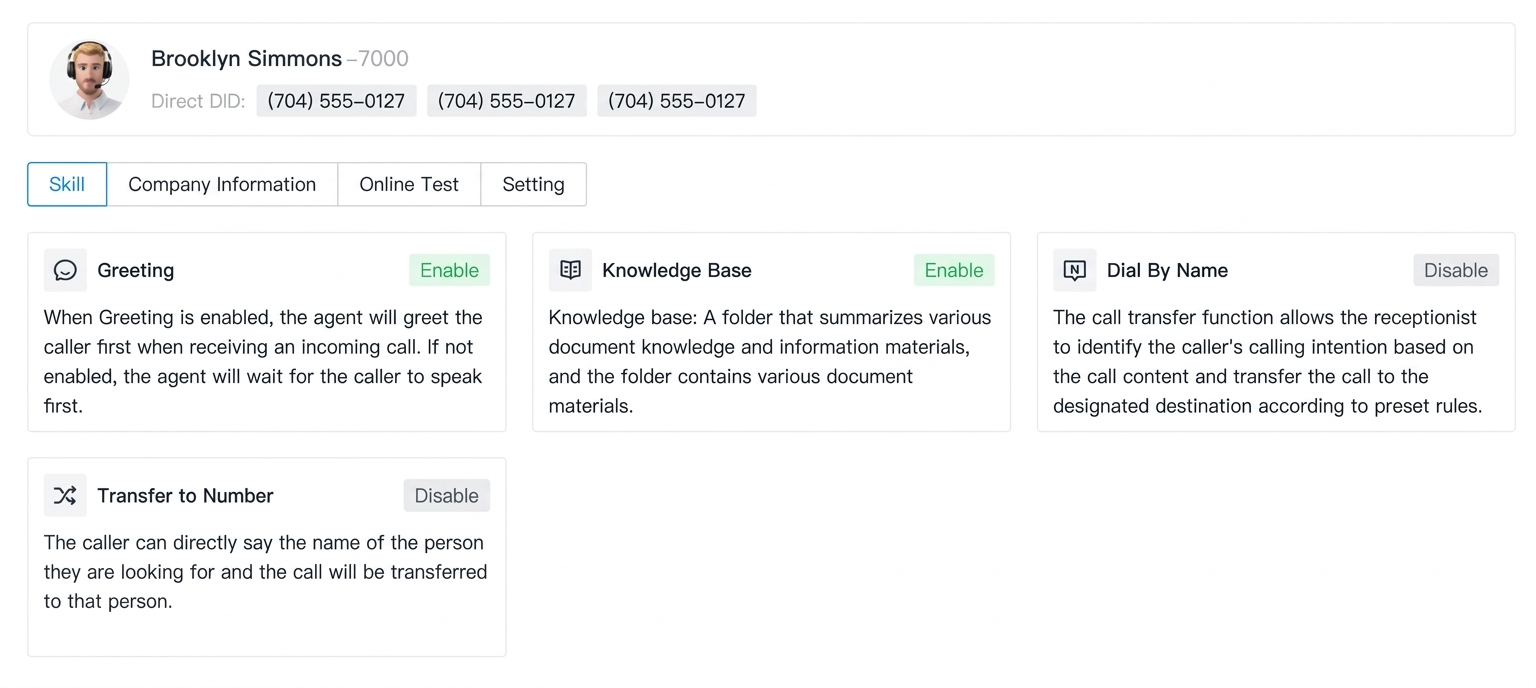
The AI Receptionist acts as a 24/7 workforce multiplier, eliminating missed leads during after-hours or staffing gaps without increasing headcount. By automating routine inquiries and intelligent routing, it ensures instant customer support while freeing your team to focus exclusively on high-value human interactions. This effectively addresses labor shortages while maximizing operational ROI.
Zero-Code Deployment: Setup in Minutes
Deploying your AI Receptionist is a straightforward process requiring no specialized IT skills:
- Create Agent Account: Add a new agent and assign a dedicated extension in the AI Receptionist dashboard.
- Personalize Persona & Logic: Select the agent’s voice and language, then upload a “Company Information” block and custom greetings. Configure transfer rules and backup destinations to ensure seamless call handling.
- Build the “Brain”: Upload documents or sync website URLs to create your knowledge base. You can assign specialized knowledge base to different agents for targeted support (e.g., Sales vs. Technical Support).
- Activate & Test: Route a inbound call to the AI Receptionist extension and start a live conversation to verify response accuracy and transfer logic before going live.
AI Receptionist Service Plan & Subscription
- The AI Receptionist is available for the P-Series Phone System Software Edition and Cloud Edition. To activate and manage this feature, an active Enterprise Plan (EP) or Ultimate Plan (UP) is required.
- To meet scalable demands, we offer flexible On-Demand Minute Packs and Monthly Rolling Plan.
- For more plan or subscription details, please contact our sales team or your service provider.
*Experience it Now: Update your P-Series system to V23.3 Beta to start exploring. For a step-by-step setup, refer to the Configuration Guide. We value your feedback, please share your interaction experiences with us via this form.
Linkus Multi-Client Login
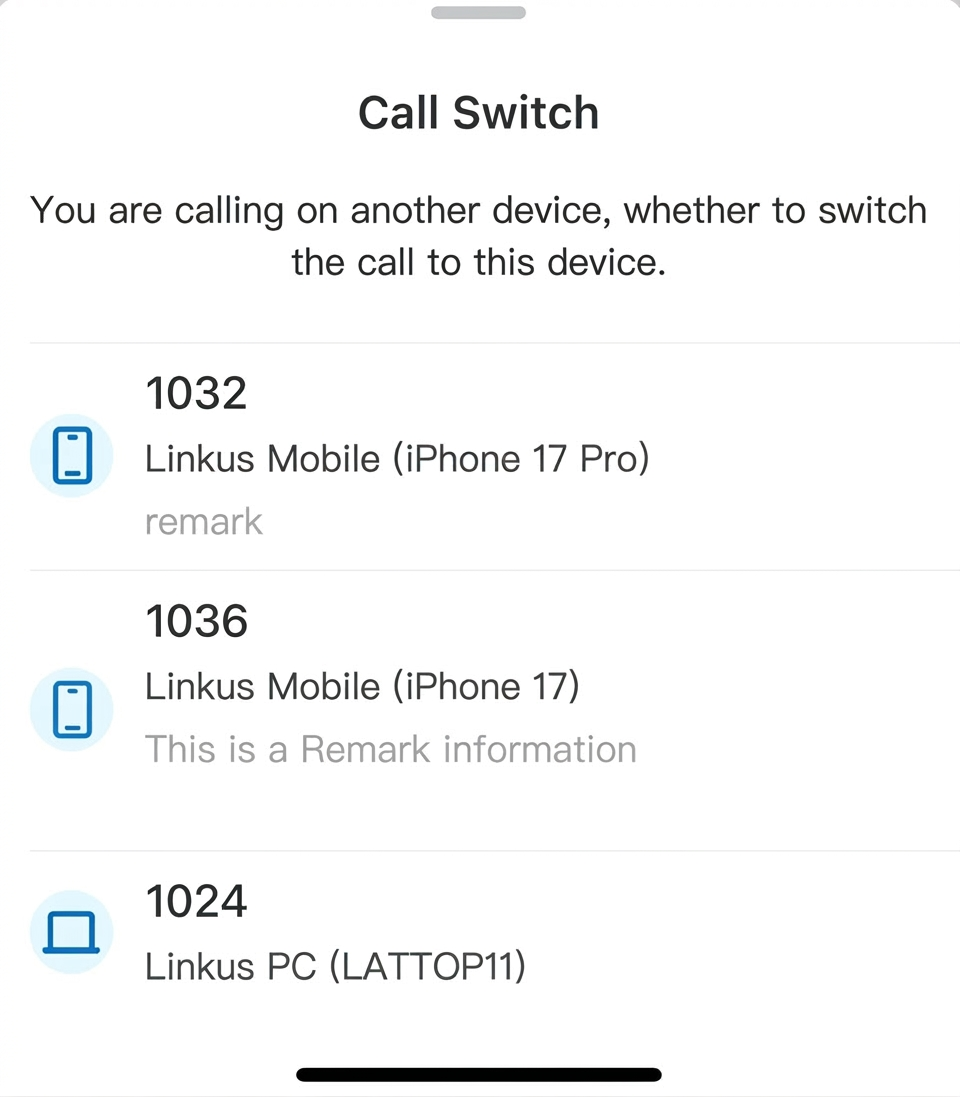
Linkus UC Clients now support simultaneous login across multiple terminals. A single extension can remain logged in across various platforms and devices simultaneously, including the Linkus Mobile App, Desktop, and Web Client, while working seamlessly with your IP phones. This ensures that users remain reachable across all their devices, perfectly meeting the demands of multi-location and hybrid work. Additionally, all client login data is automatically reported to YCM (Yeastar Central Management) for centralized monitoring.
*Requirement: Ensure your PBX system, Linkus Desktop, Web, and Mobile Clients, and the Linkus for Chrome Extension are updated to the latest versions to enjoy seamless multi-client connectivity.
Custom Call Report
Data-driven decision-making is the backbone of modern business communications, especially for high-volume contact centers. To provide deeper visibility into communication process to individual outcomes, we have overhauled the Call Reports module. This update introduces a powerful Custom Report Builder and a personalized My Reports workspace, allowing administrators to move beyond standard templates and create tailored analytical views for specific needs.
Custom Report Builder
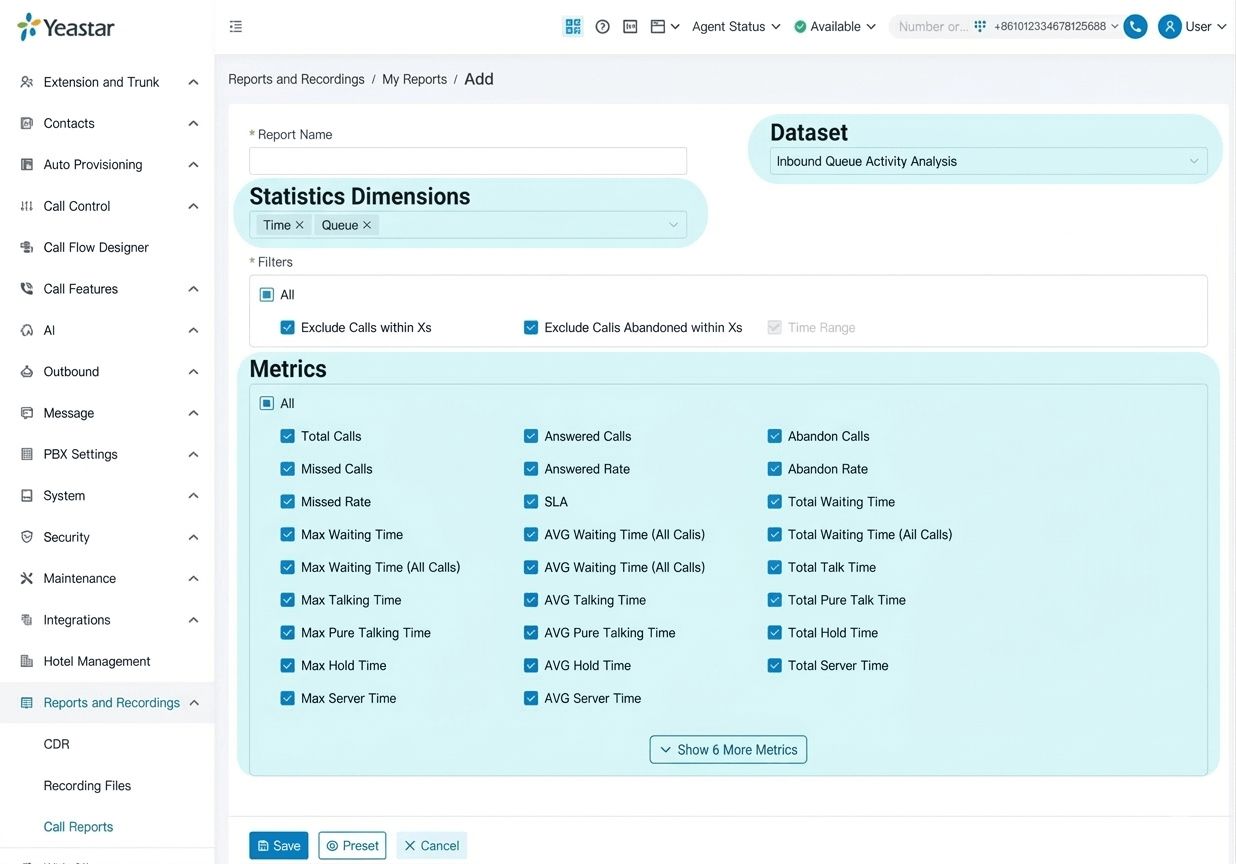
The new generator provides a structured workflow to transform raw call data into precise management intelligence. It enables a “From Aggregate to Granular” analytical approach, allowing you to define the big picture and drill down into specific details:
- Dataset Selection: Define your analytical foundation. Select the core data source like Inbound queue activity, extension statistics, or agent performance to set the scope of your analysis.
- Dimension Selection: Choose your perspective. Based on the selected dataset, define how results are grouped, whether by queue averages, agent activity time, or time Intervals to visualize organizational trends and patterns.
- Granular Filtering: Apply specific criteria to narrow the dataset. Use multi-dimensional filters like date range, agent groups, or call types to isolate the exact records required for analysis.
- Metrics Selection: Capture the results. Choose the specific KPIs and data points to display, from core metrics like total calls and answer rates to detailed outcomes like handling results or AI-generated summaries.
*Automation & On-Demand Delivery: Attach any template to a Schedule for automated recurring delivery, or generate reports On-Demand whenever specific data exports are required.
My Reports
My Reports is a dedicated workspace within the Call Reports module designed to streamline daily monitoring. It serves as a centralized hub to display favorited default and custom reports, allowing administrators to view, edit, and track associated schedule records directly from a unified interface.
Other Optimization:
- Download reports in CSV, XLS, HTML or PDF
- Support multi-language switching
*You can now create your specific call reports in the PBX V23.3 BETA version. For more report configuration details, please follow the Configuration Guide.
Onsite Proxy
Deploying IP phones across different offices often involves a trade-off between security and call quality. Onsite Proxy is a specialized solution that resolves this by allowing remote phones to connect securely to the PBX without opening unnecessary inbound firewall ports or relying on complex VPNs or public relays.

How it Works
The solution establishes a secure, encrypted tunnel that bridges the remote branches and the central PBX, enabling seamless communication through two synchronized components:
- Remote Site (Onsite Proxy Agent): A lightweight software agent deployed within the phone’s local network. It initiates an outbound encrypted connection to the PBX to establish a secure tunnel. This allows IP phones to function as if they were on the same local LAN as the PBX, supporting Plug-and-Play (PnP) discovery, Zero-Touch Provisioning (ZTP), SIP registration, and call proxy services.
- PBX Side (Onsite Proxy Server): Acting as the server-side hub, the PBX accepts and manages these incoming tunnels. From a centralized interface, administrators can create, connect, edit, and delete proxy instances while monitoring their real-time status. This server-side integration ensures that managing remote branch phones feels identical to managing local extensions.
Central Onsite Proxy Monitoring on YCM
Yeastar Central Management (YCM) provides centralized monitoring for all PBX instances’ Onsite Proxies. It offers a global view of all Proxy statuses and data, enabling users to quickly filter and pinpoint abnormal or offline instances. This batch monitoring capability significantly enhances efficiency for partners or customers managing dozens or even hundreds of PBXs.
Onsite Proxy offers a high-performance alternative to traditional remote deployment, combining the security of a “closed” firewall with the low-latency voice quality of a local network. By enabling seamless PnP discovery and Zero-Touch Provisioning (ZTP) at remote sites, it simplifies complex multi-office management into a single, localized experience.
Ready to try? Configure Onsite Proxy today directly within your P-Series Software Edition management portal. For more report configuration details, please follow the Configuration Guide.
Additional Optimizations
- Enhanced Microsoft Entra ID (Azure Active Directory) Integration:
- Simplify Integration Process: Instead of manually generating and copying Application IDs and Secret Keys to complete the integration work, admins can now simply authorize the official Yeastar public application to automatically handle the application registration and permission setup.
- Streamlined Outlook Contact Sync: Admins can now enable contact synchronization without requesting individual folder access or account sharing permissions from each user.
- User profile photos in Microsoft 365 are now automatically synchronized to PBX user profiles.
- Support to edit extension information directly from the PBX after the integration is active.
- Remote Control of Linkus Mobile Client: P-Series PBX now extends its CTI capabilities to support remote control of Linkus Mobile Clients directly from Desktop/Web Clients or embedded extensions (Teams/Dynamics 365) for seamless call handling. This is in addition to our existing CTI support for controlling phones via Linkus Web and Desktop Clients. Refer to the User Guide for more details on the full CTI solutions.
- Customize F1-F12 keys as functional hotkeys on Linkus Desktop Client.
*For full details on the P-Series V23.3 BETA updates, refer to the beta firmware release notes: Cloud Edition | Appliance Edition | Software Edition
YCM Updates (For distributors & resellers)
Yeastar Central Management (YCM) is a remote management platform for Yeastar PBX systems and gateways. This update, already available for hosted users and coming on April 7 for BYOI deployment. Read on to explore the latest features.
AI Capacity Subscription New Support
For P-Series Cloud & Software Editions users, AI Transcription (Call Transcription & Summary) and AI Receptionist features offer flexible capacity subscriptions. If the initial minutes included with the PBX are exhausted, users can extend their AI usage via two methods based on their specific needs:
- On-Demand Minute Pack (Flexible On-Demand): Add a fixed bundle of AI Transcription or Receptionist minutes to the PBX instantly.
- Best for: Businesses with fluctuating needs or those who want to trial more AI engagement without any monthly commitment.
- Advantage: Purchase exactly what is needed, when it is needed.
- Monthly Rolling Plan (Consistent Usage): Subscribe to a monthly plan that provides a recurring allotment of AI usage minutes.
- Best for: Customers with stable AI usage who want the convenience of avoiding manual re-purchasing.
- Advantage: Minutes refresh automatically each month, and multiple packs can be stacked to increase the total monthly quota.
Service Continuity & Support
- AI transcription usage is reported directly to the Yeastar Central Management (YCM). This enables distributors and resellers to receive usage alerts and proactively manage customer capacity to prevent service interruptions.
- For more details on plan tiers or subscription management, please contact our sales team or your service provider.
Enhanced Sub-level PCE Management
YCM now provides granular control over P-Series Cloud Edition (PCE) quotas and streamlined management for multi-tier partnerships.
- YCM users can now set a maximum creation limit for Hosting and Reseller packages to strictly manage the number of PCE instances each sub-user can create.
- Users can now create PCE instances directly from a sub-user’s perspective for simplified “on-behalf” setup.
Related Resources
PBX V23.3 BETA Features Configuration Guides
Keep Up with the Latest Final Releases
- Call Flow Designer Enhancements & More ( Mar 2026)
- Advanced CDR, Dark Mode & More(Jan 2026)
- One-Touch Call Park, Call Follow-Up via Email & More (Dec 2025)
- Built-in STIR/SHAKEN Solution, Red Hat SSO Integration & More (Nov 2025)
- Omnichannel Message API, PBX API Bulk Access & More (Oct 2025)
- AI Call Transcription & Summary, Virtual Fax & More (Sep 2025)


