


Public address system is widely deployed in all kinds of collective occasions, such as air and rail terminals, large-scale shopping malls, sports stadium, etc. To meet the current demands for a unified communication system, public address system is preferred to be integrated with the telephony system to streamline operations and enhance efficiency.
Snom PA1 is a SIP bridge uniting the functions of a telephone with a high-performance digital amplifier for broadcasting announcements while upgrading digital/POTs systems into SIP-based ones. Yeastar has completed interoperability testing with Snom PA1, which is to say by integrating Snom PA1 and P-Series Phone System & Yeastar S-Series VoIP PBX, our mutual customers will receive premium user experience with rich functionality from both Yeastar and Snom.
How It Works
Snom PA1 functions as a SIP extension. Once registered to the Yeastar PBX, it can be called like a regular extension to trigger announcements via the connected speaker or headset. For example, if PA1 is configured with extension number 1000, any user can simply dial 1000 to make a live announcement through the speaker connected to the Snom PA1.
This integration helps unify voice broadcasting and phone systems, providing a seamless user experience and an easy-to-manage solution.
*Special Note: Snom PA1 can register up to four SIP accounts—referred to as “identities” on Snom devices—allowing flexible broadcasting through the connected speaker.
Integration with Yeastar P-Series Phone System
Yeastar P-Series Phone System supports manual SIP registration only. To register the Snom PA1:
- Log in to the PA1 web interface.
- Go to Identities > Identity 1 and input the SIP credentials from your PBX.
-
- In your PBX extension settings, set both Caller ID and Register Name to the extension number.
- On the PA1 side:
– Account = extension number
– Password = extension registration password
– Registrar = PBX domain or IP address (e.g.,pbx.example.yeastarcloud.com or 192.168.5.150)

- Use the same domain/IP as the Outbound Proxy, and select the appropriate transport protocol (e.g., UDP).
- Save and register. Once successful, the PA1 will appear as a live SIP extension, ready for broadcasting through the connected loudspeaker.
Integration with Yeastar S-Series VoIP PBX
- Register PA1 on Yeastar S-Series PBX.
- Log in the web interface by using the IP of Snom PA1 obtained from DHCP Server.Try the default IP address: 192.168.0.2. if there is no DHCP service supported in the network.
- Change the IP address to ensure PA1 and PBX in the same segment of network.
- Once logging in the web interface, go to the menu on the left and click “Identity 1”. Then enter the required data of extension from Yeastar S-Series PBX into the « Login » tab display on the right of the page.
– Account: the extension number.
– Password: Password for your extension
– Registrar: the IP address of Yeastar S-Series PBX.
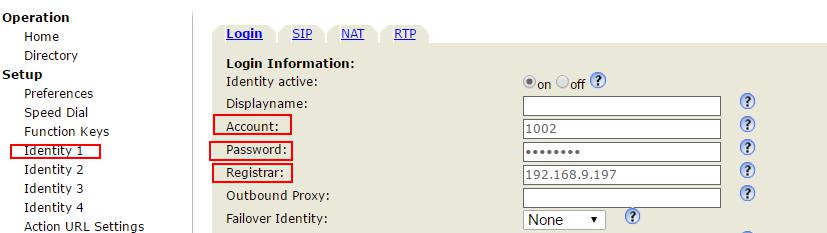
- Click « Apply » or « Re-Register ». And then click « Save » at the top of the page to make sure the change take effect.

If the registration has been successful, the red « Power » LED will turn off while the green « Call » LED will stay on, indicating that Snom PA1 is ready to receive announcements.
With compatibility across both our P-Series Phone System and S-Series VoIP PBX, Snom PA1 delivers a flexible and reliable voice broadcasting solution that integrates effortlessly into your unified communications system.
*Refer to our step-by-step guide for full S-Series configuration instructions.


